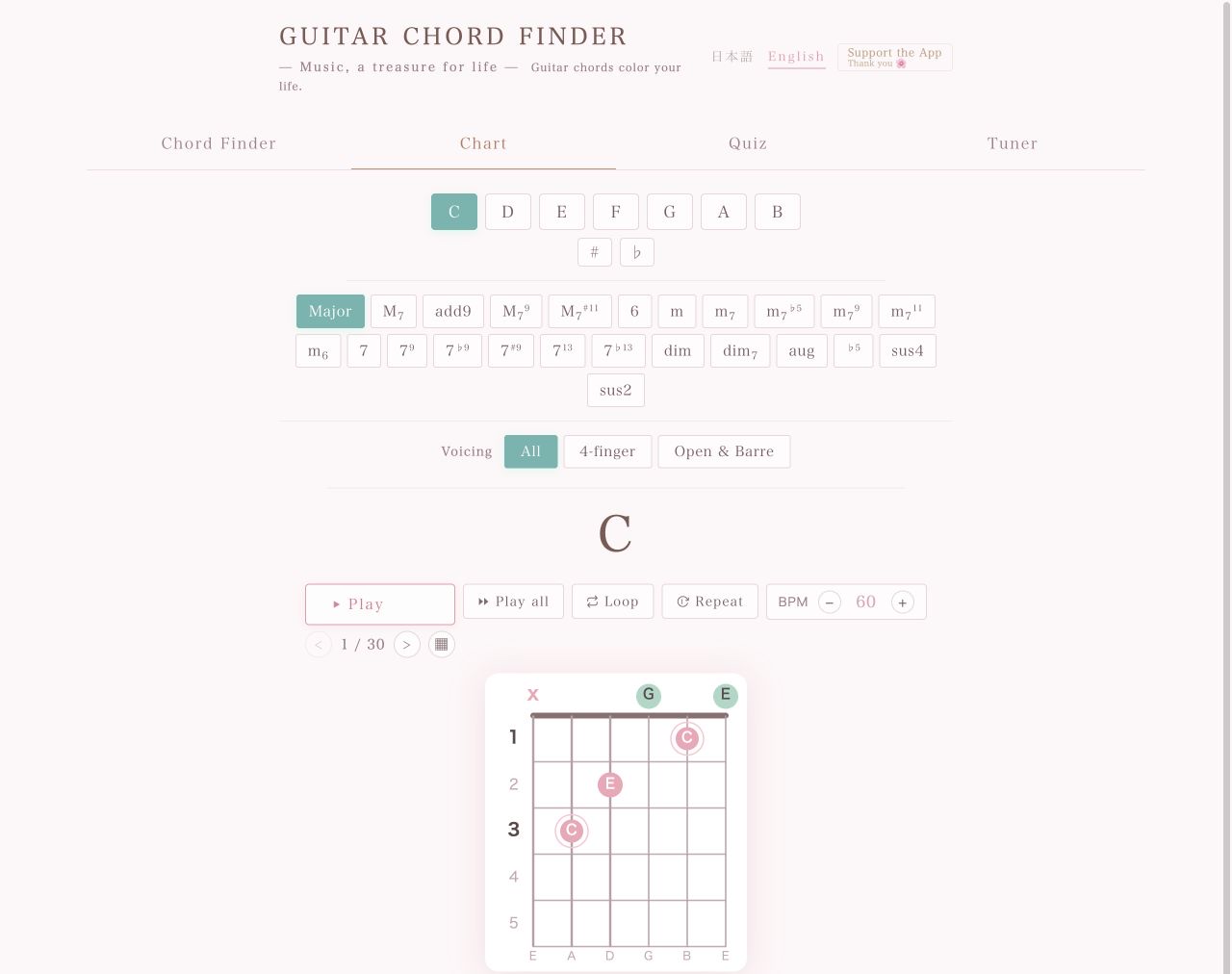
Choose a root note and chord quality to bring up playable guitar voicings. Hear each shape, compare positions across the neck, and check the sounding chord when you use a capo.
The chart opens with C Major selected. Match the numbered markers in the screenshot with the steps below, then change the controls to find the chord you need.
123456
The live chord chart. Each marker matches a step below.
The root note is the foundation of the chord
The root gives a chord its name and provides its harmonic reference. In a chord symbol, the first letter names the root: C is the root of C Major, and A is the root of A minor.
Start by choosing C, D, E, or another root. Then add a chord quality such as Major, minor, dominant seventh, or major seventh. Thinking in that order—root first, quality second—makes chord symbols much easier to understand.
Choose the root note
Select a natural note from C through B. For C sharp or E flat, choose the letter first, then select the sharp (♯) or flat (♭) spelling.
Choose the chord quality
Select Major, m, 7, M7, sus4, add9, dim, aug, or one of the extended options. In common chord notation, M7 means major seventh and is also written maj7.
Filter the voicings
Use All, 4-finger, or Open & Barre to narrow the results. Leave All selected when you want to compare the widest range of shapes.
Listen and practice
Use Play to hear the current voicing. Play all, Loop, Repeat, and the BPM control help you compare shapes or practice them at a steady tempo.
Browse alternate voicings
Use the arrows beside “1 / 30” to move through the available shapes. Select the grid button to view and compare all matching voicings.
Read the chord diagram
The vertical lines represent the six strings and the horizontal lines represent frets. A green circle marks an open string, an X marks a muted string, and the colored dots show fretted notes.
Using a capo
Select a fret in the Capo control below the diagram to see the chord that actually sounds. The familiar shape name stays the same, while the sounding chord moves up with the capo.
For example, a C shape played with a capo at the second fret sounds like a D chord. This is useful when you need to change key for a singer or replace a difficult chord with a more comfortable open shape.
8 essential open guitar chords
These common shapes use standard tuning: E A D G B E, from the sixth string to the first. In each six-string pattern, the characters run 6th string → 1st string: x means mute, 0 means play open, and a number is the fret to hold.
C major
x320106th → 1st string
6×5342302110
6th
Mute
5th
3rd fret, ring finger
4th
2nd fret, middle finger
3rd
Open
2nd
1st fret, index finger
1st
Open
Beginner tip: Curl your index finger so it does not touch the first string.
Major is the basic major triad. M7 adds the major seventh for a softer, more colorful sound; it is commonly written maj7.
Several shapes for one chord
The same chord tones appear in different places on the neck. Choose a voicing for smooth movement, comfortable fingering, or the tone that suits the song.
Green circle and X
A green circle means play the string open. An X means mute that string so it does not sound.
Note names and scale degrees
Switch between note names and scale degrees below the diagram. Scale degrees reveal the root, third, fifth, seventh, and other chord tones in the voicing.
Frequently asked questions
Why does the same chord have several voicings?
The notes in a chord occur in several places on the fretboard. You can choose an open shape, a barre chord, or a voicing higher up the neck to suit the song.
Does a capo change the chord name?
The shape under your fingers keeps its familiar name, but the sounding chord is transposed upward. The chart shows both so you can tell what the audience actually hears.
Do I need to sign up or install anything?
No. The chord chart runs directly in your browser.